Monday, October 17, 2022

Mini VCI Firmware V1.4.1 vs V2.0.4

 Which firmware version of Toyota Techstream cable is better? Mini VCI V1.4.1 or V2.0.4?


More info about mini vci j2534 with firmware 1.4.1 & 2.0.4:

The clone cables used 1.4.1 or 1.4.6 (latest) firmware.

mini vci firmware 1.4.1

The “real” cables use 2.0.1 or 2.0.4 (latest).

mini vci 2.0.4

They are all clone Techstream cables of course but the good fakes use the same firmware as the real Xhorse cable. The 2.0.4.


Back Story:
1) Original TechStream cable/machine costs $5000+.
2) Drew Technologies created the Mongoose MFC cable as an alternative to TechStream. It’s legit and supported for TechStream Lite but the cable costs $500.
3) XHorse is a clone of Mongoose. Costs about $100. This is “legit”. 100% works with all modern Toyotas.
4) Chinese clone mini vci of XHorse. This is what most people are buying. The good fakes use the same firmware as XHorse. These ones will work just like the XHorse except you get no L-line support for flashing ECUs. This is fine for most people.

Firmware 2.0.4 supports all the diagnostic communication protocols needed for Toyota (since 1996). Better performance and compability ( Activate Test , Customize function, ECU Reprogramming etc.) !

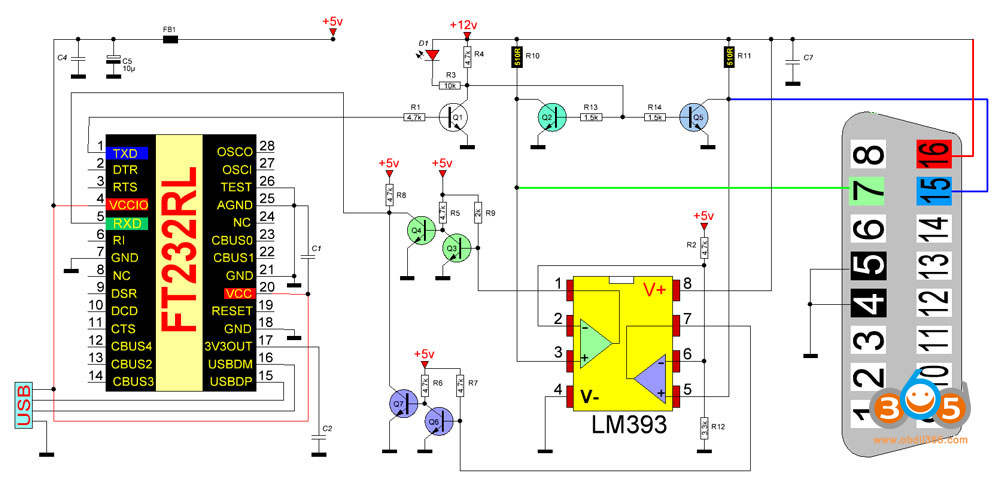
The latest 1.4.1 firmware interfaces have both CAN chip (xx1050) and K-Line chip (fake discontinued si9241a = LM393 in a different circuit), so they may full support these 2 protocols for Toyotas since 1996+. Only missing VPW chip (and si9241a for L-Line).

They will not work on the 2011 Prius as some on PriusChat have said.

Fake 9241A chip

Fake 9241A chip

Real 9421A chip

Real 9421A chip

LM393 instead of 9241a

LM393 instead of 9241a in a circuit for vag com kkl 409.1


Mini vci 2.0.4 firmware PCB
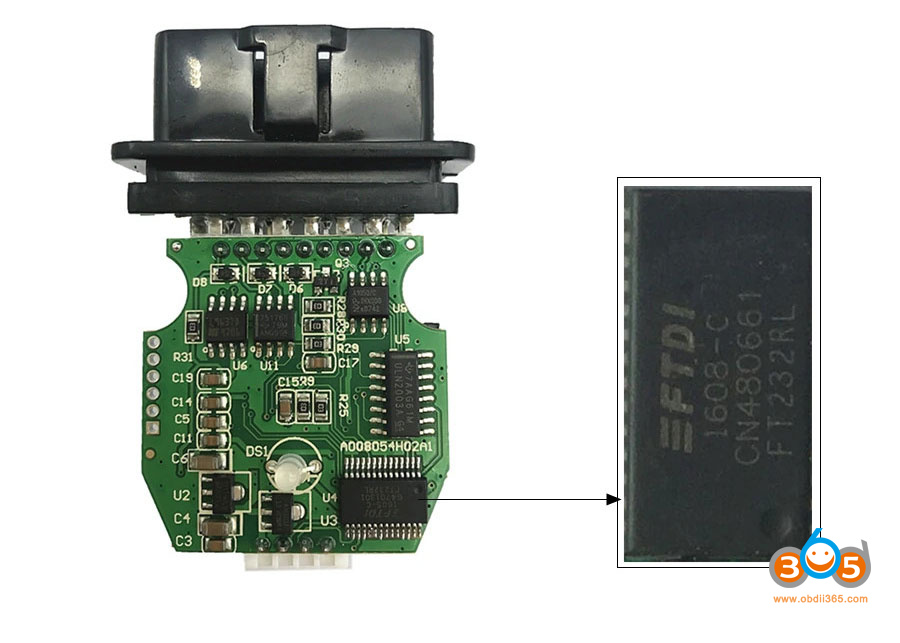
Mini vci 2.0.4 firmware PCB 1

Mini vci 2.0.4 firmware PCB 2


Mini VCI 1.4.1 firmware PCB

Mini VCI 1.4.1 firmware PCB 1

Mini VCI 1.4.1 firmware PCB 2


2.0.4 cable is now only available in ali or ebay, twice as expensive than 1.4.1 cable.  If you need to troubleshoot K-line Toyota/Lexus, 1.4.1 is fine. 1.4.1 is tested working with the latest Toyota.

MINI VCI Techstream V17 Tested Working on 2022 Tundra


There is no reason to try to update firmware. Interfaces with 1.41 will be bricked if you try to update firmware. There is not enough space inside the chip.

If bricked your mini vci j2534 cable, follow the DIY solution to fix it.

How to Fix Bricked Mini VCI J2534?

Read also:

http://blog.obdii365.com/2022/06/24/vxdiag-mini-vci-1-4-1-or-2-0-1-for-old-lexus-sc/

Wednesday, October 12, 2022

How to Repair Bricked Chinese Mini VCI?

 Here is the customer DIY solution for those who bricked their mini vci j2534 interface after using Firmware update tool.

mini vci j2534 cable

SOLUTION:
STEP 1: Download the hex file attached.
STEP 2: Download Flash Magic (used version 13.20)
STEP 3: Connect the mvci device to an USB port
STEP 4: Open Flash Magic, select LPC2119 (LPC2000) in the field device
STEP 5: Select the serial port: i.e serial port COM3, try to remove the mvci device and plug it again to see if the FlashMagin detects the COM port automatically (maybe is better to remove all others USB devices during the process (my case))
STEP 6: Baud-rate: I selected 38400, but maybe other (lower) can provide a secure flashing.
STEP 7: In the Firmware panel update the .hex file.
STEP 8: Press the giant button START. The flashing should start, it takes a while (2 min aprox. for me, I read others could take 20 min)
STEP 9: When Flash Magic get out of the busy state, the process is finished, close the software and remove the device of USB port.

To confirm that it was restored to 1.4.1 version open the Firmware Update tools and check the firmware version.

Free download mvci-MVCI006000001


  1. Be sure your device is connected and recognized by the computer. Try connect to your computer with driver FDTI FT232 (be sure your system is 32bits or 64bits). (MVCI J2534 china clone use this driver https://www.ftdichip.com/Drivers/D2XX.htm)
  2. Once connected, easily will be recognized by Techstream in Windows 32bits. For 64bits, you need search online
  3. Save your current firmware with FlashMagic (Read & Save) before updating
  4. Update Hex firmware 1.4.1 (attached compressed file, unzip the entire folder with 7zip or whatever unzip program)

NOTE:

FlashMagic access to LPC2119FBD64 microcontroller from MVCI J2534 selecting LPC2119 (LPC2000) in the field device. If FlashMagic don’t read your device, probably you have to open it to identifier the microcontroller type.
If the MVCI clone is built on a fake FT232R chip, it is possible the installation of fresh drivers has reset its EEPROM.
Years ago FTDI released a driver (2.11.0 and 2.12.0) that bricks chips that it believes to be counterfeit. What it did was to set the PID (Product ID) to 0000 instead of 6001 which renders the chip unusable as Windows cannot find a driver for it.
There are many post how to identify fake FT232R chip and how to fix it.

Once you are sure your device have PID 0000, one of the solutions is flash it with the attached archive that contains an ept file using “FTDI Mprog 3.5“

ft232r_eeprom


Feedback:
1). The drivers are ok.
I have 2 other white/transparent MVCI devices:
– cheap one  firmware v1.4.1
– full chip one firmware v2.0.4

Both work fine without any problems.
I even have the impression that the cheap one works better then the Full Chip MVCI.

2).

This worked. I was able to flash the .hex file using FlashMagic, and the dongle connects to the truck. I had previously flashed to 1.4.8, and then back to 1.4.1, but using the “official” firmware, not the clone firmware, while trying to use this on 64bit Windows. After flashing back to your 1.4.1 image, it works great. I’ll stick with my 32 bit Windows 7 image for now.
3).

I tried to recover my dead Chinese MVCI cable with mvci-MVCI006000001.hex file.
In my case, I need put LPC2119 to ISP mode before flash with the file.

To this, I figured out just short holes on P2 of the PCB when connecting USB.
  

fix bricked mini vci j2534 cable 1

LPC2119 entering to ISP mode if successfully, LED keeps green. (fig2)

fix bricked mini vci j2534 cable 2

I think it is successfully flashed my dead MVCI cable with the hex file.

fix bricked mini vci j2534 cable 3


In a nutshell, there is no reason to try to update firmware. Interfaces with 1.41 will be bricked if you try to update firmware.

Monday, September 26, 2022

Mini VCI Techstream Add Toyota Tundra 2016 New Key

How to use Mini VCI Toyota Techstream V12 software to program a new key for Toyota Tundra 2016.


Procedures:

Connect MINI VCI cable to Toyota Tundra obd port,then run Techstream software

And click “Connect to Vehicle” button at right side menu

Confirm the vehicle information and press Next

Mini VCI Techstream Add Toyota Tundra 2016 New Key 1


After then click “Immobiliser”

Mini VCI Techstream Add Toyota Tundra 2016 New Key 2


Click “Utility”

Mini VCI Techstream Add Toyota Tundra 2016 New Key 3


Then select desired utility “Key Registration”option and press Next button.

Mini VCI Techstream Add Toyota Tundra 2016 New Key 4

This function is used to register immobiliser keys, press Next to proceed.

Mini VCI Techstream Add Toyota Tundra 2016 New Key 5

Once you get here just follow the instructions and you gonna program the key.


Monday, August 29, 2022

Toyota Techstream V17.20.013 with Patch Free Download

 Latest version Toyota Techstream V17.20.013- 08.2022 + loader was tested working fine. The software can be downloaded free here.


Version: Techstream V17.20.013

Release Date: 08/2022

Region: All regions
Type: Diagnostic tool Software
OS: WinXP, Vista, Windows7, WIN8, WIN10, Win11 32bit & 64bit

Vehicle coverage: 1996-2022 Toyota Lexus

Compatible devices: VXDIAG VCX NANO Toyota (don’t need MVCI driver), Mongoose pro, Openport 2.0, SM2 Pro, Mini VCI J2534 Item #SV46-D, SV46-D1

Free Download Toyota Techstream V17.20.013

Free download Techstream 17.20.013 software incl. loader

Techstream Setup v17.20.013.exe  & patch

https://mega.nz/file/DFRghLRb#5xjGIWjk0JdZzyPPpPrzgNce52luewTBaUhM6cgiwPo


Include:

  • Techstream v17.20.013 and Loader (08.2022).exe
  • Patch 32bit & 64bit
  • Drivers.rar (MINI VCI driver 32bit & 64bit, Mongoose pro MFC driver 32 bit & 64bit, VXDIAG driver)


Language: 

Japan: Japanese, English

North America: English, French, Spanish

Europe: English, German, French, Spanish, Italian, Chinese, Turkish, Russian

Other regions: English, German, French, Spanish, Italian, Chinese, Turkish, Russian


How to install:

1. Install the Program Toyota Techstream 17.20.013
2. Copy TS Loader into the installation directory — Toyota Diagnostics\Techstream\bin\
3. Create a link from the TS_Loader on the desktop you like
4. Start TS_Loader
5. Have Fun

Free Download Toyota Techstream V17.20.013 with Patch 1

Free Download Toyota Techstream V17.20.013 with Patch 2

Free Download Toyota Techstream V17.20.013 with Patch 3

Tuesday, August 23, 2022

Mini VCI and Techstream Review on Lexus SC430 2007

 Which cable and techstream version for Lexus SC430? Check the user test report and review below.


My mini vci v1.4.1 cable off obdii365.com works with the following
2002 SC430
2007 SC430
2004 Tacoma
2010 Camry


There are several versions of the cable floating around, but there are two major distinctions:

V1.4: Most common. Cost: $20-50

V2.0: Difficult to find. Many devices that claim to be V2.0 are actually just scams. Cost: $50-$100


Let me start by saying cable v2.0.4 only read the VIN data of my 2007 SC430 but wouldn’t change any settings or command the seat ECU to recline the passenger seat back. I think the cable or chip has issues.

Cable v1.4.1 worked 100% as usual.

I have an old Gateway laptop running WinXP 32bit.
I am running Techstream v15.00.016 but I first loaded v12.10.019.  It seems to function the same for my cars.

Here is the link to the 5 min install
http://blog.obdii365.com/2019/11/04/download-techstream-v12-vmware-for-vxdiag-toyota/
if you want to download TechStream directly to your laptop, click link below
You will probably need WinXP or Win7 32 bit to do it this way.
you may need to download a free copy of winrar to unzip or unpack the v12 files.

http://blog.obdii365.com/2017/05/09/toyota-techstreamv12-10-019-free-download/

here are some pics of a couple of operations

Mini VCI and Techstream Review on Lexus SC430 2007 1

A lot of customized functions

Mini VCI and Techstream Review on Lexus SC430 2007 2

Mini VCI and Techstream Review on Lexus SC430 2007 3

I selected the engine ECU button…then data list.  Those are the live engine data screens. I have noticed some Toyota and Lexus models separate transmission live and engine live data access, while others combine engine/transmission live data.

Mini VCI and Techstream Review on Lexus SC430 2007 4

Mini VCI and Techstream Review on Lexus SC430 2007 5

Mini VCI and Techstream Review on Lexus SC430 2007 6

Mini VCI and Techstream Review on Lexus SC430 2007 7

command the seat ECU to recline the passenger seat back

Mini VCI and Techstream Review on Lexus SC430 2007 8

Mini VCI and Techstream Review on Lexus SC430 2007 9

Mini VCI and Techstream Review on Lexus SC430 2007 10

Mini VCI and Techstream Review on Lexus SC430 2007 11

Mini VCI and Techstream Review on Lexus SC430 2007 12

Allows to register TPMS

Mini VCI and Techstream Review on Lexus SC430 2007 13

Mini VCI and Techstream Review on Lexus SC430 2007 14

It also has a change VIN function.

That could be handy if you buy a used ECU and need to match it to your car.  not sure cause i didn’t get a chance to test it.

Mini VCI and Techstream Review on Lexus SC430 2007 15

Personal experience: this mini vci 1.4.1 cable works perfectly. Good enough for reading/clearing codes and diagnostics.

Wednesday, July 13, 2022

Mini VCI Toyota Techstream 4Runner 2003 Review

Decided I didn't want to wait for the VXDiag tool from China and bought a cheap mini-VCI J2534 cable off obdii365.com. Received that Saturday night. 
https://www.obdii365.com/wholesale/2018-new-mini-vci-cable-for-toyota.html

Installed TechStream v14.20.019 onto the laptop and found some drivers for the mini-vci. Techstream works fine on Windows 10 64 bit since the OS is backwards compatible with most 32 bit programs. The problem was not having all the drivers and such for the mini-vci cable. Windows installed a driver but there was no communication with the trucks ECUs.

Fought this all morning Sunday and finally found the correct information to get everything working. Part of the problem was that i did not install software for the cable yet. They got me the download link I needed for the missing software. Once I had that, I followed the directions that are included, along with some other posts that I found on various forums via google searches. Finally got the cable working and TechStream was able to communicate with the 4runner 2003.

Made changes to the customization settings that are available, like turning off the DRL, setting the remotes to unlock all doors with a single click instead of the double it had been and a few other minor changes that I found I wanted since the options were there. Everything was great until I drove the truck. VSC TRAC and VSC OFF lights were now on solid.

Spent another couple hours fighting this. Finally got it figured out with the help of my friends. Turns out that there is a chance that whenever you connect ANY OBDII type device, including the mini-vci while running TechStream, it will trip a C1336 code. That means that the VSC TRAC system calibration has been undone and needs to be reset. Unfortunately, you can't do the recalibration using TechStream. You either need the fancy Toyota tools to do it or you do it manually using a couple wires and following a few steps that are provided in the repair manual. I used the couple wires method and was able to perform the zero point calibration, turning off the dash lights. All was fixed again.

Toyota TechStream is pretty cool, lets you set various customizations like I pointed out above and also check and verify the health of all the ECUs in the truck. There are several and each one can have it's own issues. I didn't have any codes on any of them, excepting the C1336 which took forever to show up. I had to have the truck running, TechStream hooked up and monitoring things and then move the truck a couple feet forward and back to get the code to finally show up. It will also come in handy for if I ever need to replace the brake master or vacuum booster reservoir thing, I think it's called the accumulator or something. TechStream can bleed vacuum off and reset the zero point calibration for that as well. Basically, it's a must have tool for these ECU laden, newer Toyota vehicles.
Mini VCI Toyota Techstream 4Runner 2003 Review


Mini VCI vs Openport 2.0 with Toyota Techstream

 Mini VCI and Tactrix Openport 2.0 which is a better j2534 interface for Toyota Techstream software?


MINI VCI:

A lot of users have been using the mini-vc1 j2534 cable and it works fine with techstream. It is compatible with all versions techstream. The latest V17 allows accessing 2022 Toyotas.
But some versions/driver/firmware couldn’t see ant settings in the customize options.
The mini VCI is a hit and miss as far as getting data (i.e on Tundra). Sometimes it wouldn’t display all the module information.

Search http://blog.obdii365.com/tag/toyota-techstream/ you will see all techstream information

mini vci cable vs openport 1

Openport 2.0:

I switched to the Openport and it works great. It’s the same one OV Tuning used for their programming.

I use this dongle. It’s the same one OV tuning uses and is available on obdii365.com and is around $30. The Mini VCI won’t give you full access.
Use this adapter. https://www.obdii365.com/wholesale/new-tactrix-openport-2-0-ecuflash.html

Works great and will read all the data. Some other interfaces won’t. It’s the same adapter that OV tune uses for his tunes.

openport with techstream v17

I’ve been happy with the Tactrix on Prius Gen 3 as well; it can complete a brake bleed, and it can get ECM data list info, and the Mini VCI that I was using before that was unable to do those things.

But the Tactrix has failed to completely register new TPMS IDs on Prius (Techstream accepts them, and tries to set them, but then reports an error, and after reconnecting, the new IDs are shown, but the TPMS light is still on), and that operation went fine when I retried with the mini VCI.

Don’t buy Openport from Amazon
I took a chance on Openport 2.0 sold on Amazon for around $30 buck and works well. It looks identical to the OVTune Openport 2.0 that I use to have for my Tacoma. The Amazon Openport comes with software that I didn’t and won’t install. My Openport drivers that were previously installed worked perfectly and I’m happy to say I can now read all my data on Techstream.
BUT I can’t recommend this product any longer. The Amazon one failed after about a month.

I have both but the mini VCI was inconsistent in providing all the data. It was very much a hit and miss. The Openport is very reliable and is also the one OVtune uses in their programming.
There are clones of the Openport that are junk. They work perfectly for about a month then go dead. The one I bought from obdii365.com has been going strong for more than a year.

(Check: How to choose the right Openport 2.0 clone)

If failed to get techstream working with openport or not stable, get the right driver to work.

Go to the Orange Virus Tuning website and download the software for the openport. That what users have been using. When you open up Techstream you should see the option for the openport. The MVCI won’t work.

set up openport with techstream
You have the openport 2.0 drivers installed, and checked that they are working.

But for some reason techstream version 16 has reduced capability. You can install older version 13 and it works fine.

Version V13 only has vehicles up to 2018. If you need 2020 and up Toyotas, better use V17.


In a nutshell, no hardware is perfect. No software is perfect as well. Openport access more modules than mini vci. Mini VCI does better in TPMS than Tactrix. It depends on your need.

Tuesday, July 12, 2022

MINI VCI Disabled the Seatbelt Chime on 2022 Tundra

 Has anyone been able to get TechStream working with their 2022? Our customer has good lock with the mini vci techstream cable.


Techstream review on 2022 Tundra:

I’m using mini vci cable firmware 1.4 and Techstream version 17.00.020. This page has links to download both the Techstream 17.00.020 installer and the crack patch.

Free Download Toyota Techstream V17.00.020 Software, Patch and Driver


I bought this one off obdii365.com. Ships from China. Took about 2 weeks.
https://www.obdii365.com/wholesale/2018-new-mini-vci-cable-for-toyota.html

Latest TechStream runs just fine on Windows 10. I haven’t tried Windows 11 though. You will need to disable any 3rd party anti-virus software and also Windows Defender as it will detect the OBDII cable driver installer as a virus (which it could well be).  I run TechStream on a spare laptop that was wiped and Windows re-installed.

It connects to my ‘05 4Runner without problem.

Finally got my new 2022 Toyota Tundra Platinum truck. I can confirm that my cable with firmware version 1.4 (when used with Techstream v17) can successfully connect to and change settings on the 22 Tundra.

I’ve used techstream on my 2022 just fine. Used it to disable the seatbelt chime. Not only can it be disabled, it can be enabled/disabled per seat. Driver, front passenger, rear left, rear center, rear right.

There are so many… for example the sensitivity of the auto headlamps and auto dimming, seat heater strength, door lock/unlock settings, hvac controls, and a bunch of other settings that are also customizable via the instrument panel menus.

MINI VCI Disabled the Seatbelt Chime on 2022 Tundra


Friday, June 24, 2022

Mini VCI 1.4.1 or 2.0.4 for 2002 2007 Lexus SC430?

 What Toyota Techstream cable works on old Lexus SC (2002 SC430 and 2007 SC430)?


The cable firmware version should be considered. The firmware communicates with your vehicle and the software provides diagnostic functions.


People have tested both cables firmware versions but v1.4.1 will only work on 2002 and 2007 SC430s. V2.0.4 will not communicate with the SC430s but will communicate with relatives 2010 Camry.


Mini VCI firmware V1.4.1: Yes


Mini VCI firmware V1.4.1 lexus sc430 1

works very good on

2002 SC430

2007 SC430

2004 Tacoma and other old Toyotas

Tested 1.4.1 cable and ver 10/ ver 12 software that worked with both 02 and 07 SC.

Mini VCI firmware V1.4.1 lexus sc430 2

Mini VCI firmware V1.4.1 lexus sc430 3

Mini VCI firmware V1.4.1 lexus sc430 4

Mini VCI firmware V1.4.1 lexus sc430 5

Mini VCI firmware V1.4.1 lexus sc430 6

Mini VCI Firmware 2.0.4

the firmware ver 2.0.4 and software version 12 work with 2007 SC430 but don’t work on 2002 SC430 (k-line).

This was using v2.0.4 on 2007 SC430, unable to connect to VIM.

Mini VCI Firmware 2.0.4 lexus sc430 1

Mini VCI Firmware 2.0.4 lexus sc430 2

VXDIAG VCX NANO for Toyota

vxdiag does not work on 2002 SC either. It works fine with 2007 SC. 

It is a known problem of vxdiag, failed to work on 02 03 Toyota K-line protocols.

But on newer cars, neither of the 1.4.1 or 2.0.4 cables will reprogram TPMS sensors when switching wheels, replacing sensors, etc.  The hardware cable solution most frequently mentioned there is to get a VXDIAG VCX NANO.


Carista OBDII: No

Carista only does basic OBDII readouts for older vehicles (like 2002 Toyota/Lexus models).

Carista will not work on lexus SC. But it works well on LS series. 


How to choose among these cables?

If need both new and old Toyota, mini vci v1.4.1 is good and cheap option.

If don’t have K-line Toyota, choose mini vci 2.0. 4 and vxdiag.

mini vci is very limited on Toyota/Lexus hybrid but vxdiag performs well.

vxdiag vcx nano does no tpms programming, mini vci does not. vxdiag is faster than mini vci.